Week1 : Creating a Datalake in AWS
This week we have learned a lot about Data Storage. As an practice exercise in class, we created a Data Lake using Hadoop. So, for my self learning practice, I want to do the same thing in a Cloud Storage.
I have chosen AWS cloud. I am going to use for personal project and I want to take advantage of students benefits. Both Amazon and Google have benefits for noobies, but Amazon has 200 dollars in credits for 12 months (this is as long as my course takes).
Amazon has different pricing tiers regarding “how hot” is the storage, in the sense that Frequent Access storage is more expansive than storage used for backup. Since I am planing on using all data that I add to my lake, and I want to use it on a frequency of once-a-week or once-a-month, I will consider Frequent Access storage.
I am expecting that my USD 200 will translate to 411 GB (stored by month, during 12 months).
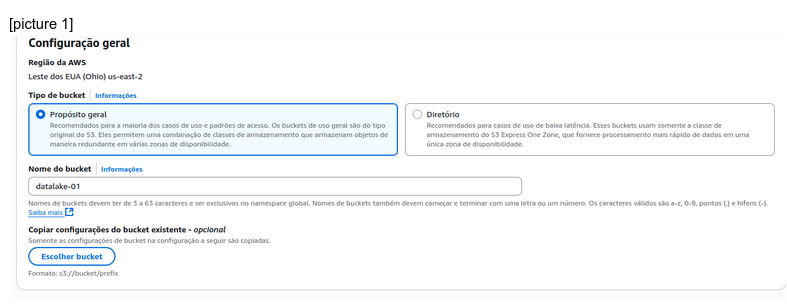
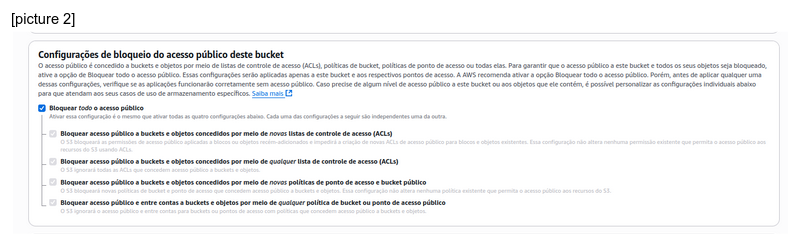
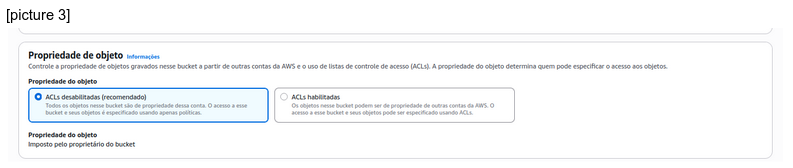
Amazon has a bucket system, right now I don’t know the ins-and-outs of what that means. But I followed a youtube tutorial and I feel okay with the settings.
[picture 1]
[picture 2]
[picture 3]
It is very easy to create 3 folders called bronze, gold and silver.
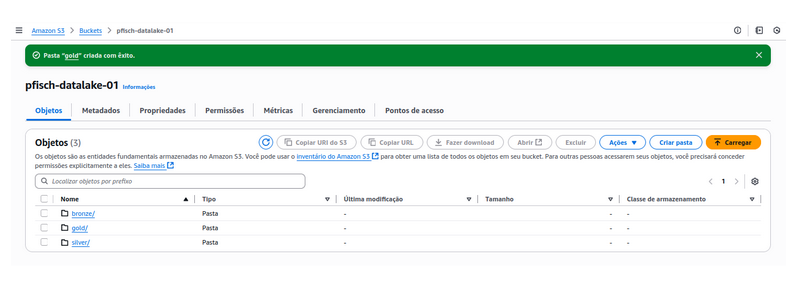
Right now, all of these folders are empty. But they will follow this structure:
Bronze (raw): All data sources, with little to no transformations or cleaning. Only Data Engineers should have access (since this is a 1 woman band, so irrelevant)
Silver (trusted): Apply some transformations like deduplications, data cleaning, PII, access control
Gold (analyctics): Add business logic, do some data modeling ...
This is a first step towards being a better data engineer, with handson projects that I can share with people online.
My goal is not to strive for perfections but build my castle 1 brick at a time.